SMS Program & Consent
Last updated: July 23, 2026
1. Who sends the messages
2. The two ways you can opt in
A phone number is signed up for ChairBooks appointment texts in exactly two ways, and both are documented in full below:
- Online — you tick an unchecked box yourself on the studio's public booking page (section 3).
- In person — you ask your stylist at the chair, we text you a one-time invitation, and you sign up by replying REMIND from your own phone (section 4).
There is no third path. A stylist cannot switch texts on for you, and neither can we — in both flows the action that grants consent is yours.
3. Opt-in 1: the checkbox on the booking page
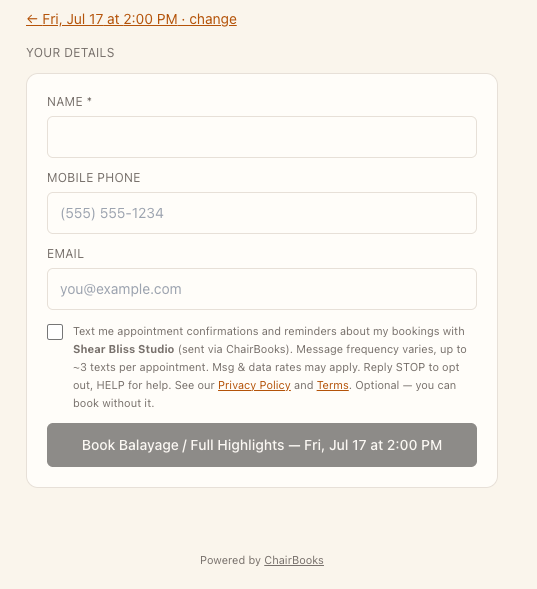
Consent is collected on the studio's public ChairBooks booking page. After you choose a service and an appointment time, the "Your details" step shows a checkbox that is unchecked by default and separate from any Terms or Privacy acceptance. You opt in only if you actively tick it. The checkbox reads:
“Text me appointment confirmations and reminders about my bookings with [Studio Name] (sent via ChairBooks). Message frequency varies, up to ~3 texts per appointment. Msg & data rates may apply. Reply STOP to opt out, HELP for help. See our Privacy Policy and Terms.”
Opting in is optional. You can complete a booking without a phone number and without ticking the box — no text is ever sent unless you tick it.
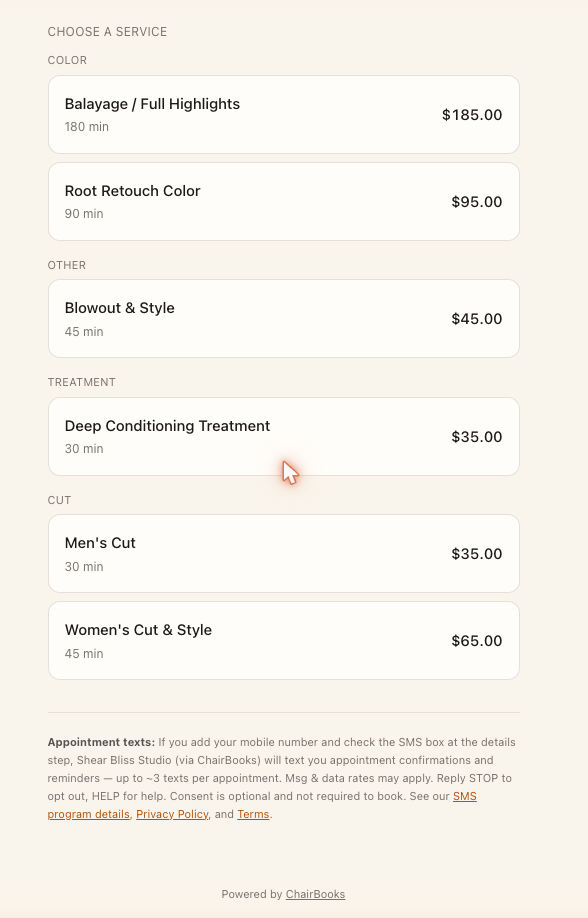
These images show that checkbox in its unchecked default state with its full language, and the SMS disclosure that appears on the first screen of the booking page before any interaction.
4. Opt-in 2: in person, confirmed by your own text reply
If you ask your stylist for text reminders while you are in the chair, she does not switch them on. She records your request, which sends you one invitation text — and you decide, from your own phone, whether to sign up. This is a double opt-in: the request and the consent are two separate acts by two different people, and only the second one turns texts on.
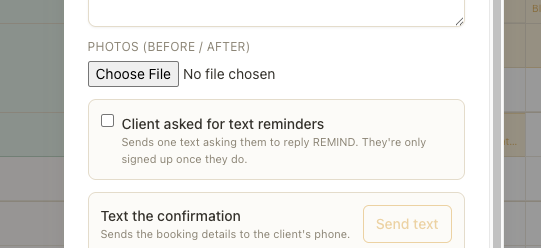
Step 1 — your stylist records that you asked
In her appointment screen there is a checkbox reading “Client asked for text reminders”, unchecked by default, with the note: “Sends one text asking them to reply REMIND. They're only signed up once they do.” Ticking it sends the invitation below. Ticking it does not opt you in, and there is no other control anywhere in ChairBooks — for a stylist or for us — that can.
Step 2 — you get one invitation text
This is the message, word for word:
“Hi [Your First Name], [Studio Name] (via ChairBooks) would like to send you appointment reminder texts. Reply REMIND to get them. Msg & data rates may apply. Reply STOP to opt out, HELP for help.”
Step 3 — you reply, and only then are you opted in
Your consent is set only by your own reply of REMIND from your phone. If you do not reply, nothing happens and you receive no reminders. Ignoring the invitation is a complete and final answer.
Step 4 — we confirm it back to you
The moment your reply lands, you get this confirmation, word for word:
“You're set. [Studio Name] (via ChairBooks) will text your appointment reminders, up to 3 texts per appointment. Msg & data rates may apply. Reply STOP to opt out, HELP for help.”
The limits, plainly
- Consent is set only by your own reply of REMIND. No stylist, administrator, or ChairBooks employee can set it for you.
- You will receive at most 2 invitations, ever — the first one, and at most one reminder to it.
- A second invitation cannot be sent until at least 7 days after the first.
- Replying STOP is permanent. It ends the texts, and it also blocks any further invitation — a stylist cannot invite you again after you stop. Only you can turn texts back on, by opting in again yourself.
- The invitation is the only message sent before you opt in, and it is transactional: no marketing is ever sent through this program.
5. What we send and how often
Two kinds of transactional message, tied to your own appointments:
- A booking confirmation when your appointment is created.
- Reminders before your appointment (typically a week out, two days out, and the day before).
Message frequency varies with how many appointments you book — up to roughly 3 texts per appointment. Message and data rates may apply.